Licence and seats
See your plan, the features it includes, how many seats are in use and when the licence expires.
The Licensing page shows what your plan gives you: how many people may build in Studio, which features are switched on, how many apps you may provision and until when the licence is valid. It is a page to read, not to change. The plan itself is agreed with VDS, so this page tells you where you stand before you ask for more.
Who can do this
Admins of Cortex Control. The page is read-only: the plan is set by VDS.
Open the page
Open Settings and choose Licensing (under Organisation). The description reads "Your VDS plan and the seats it includes."
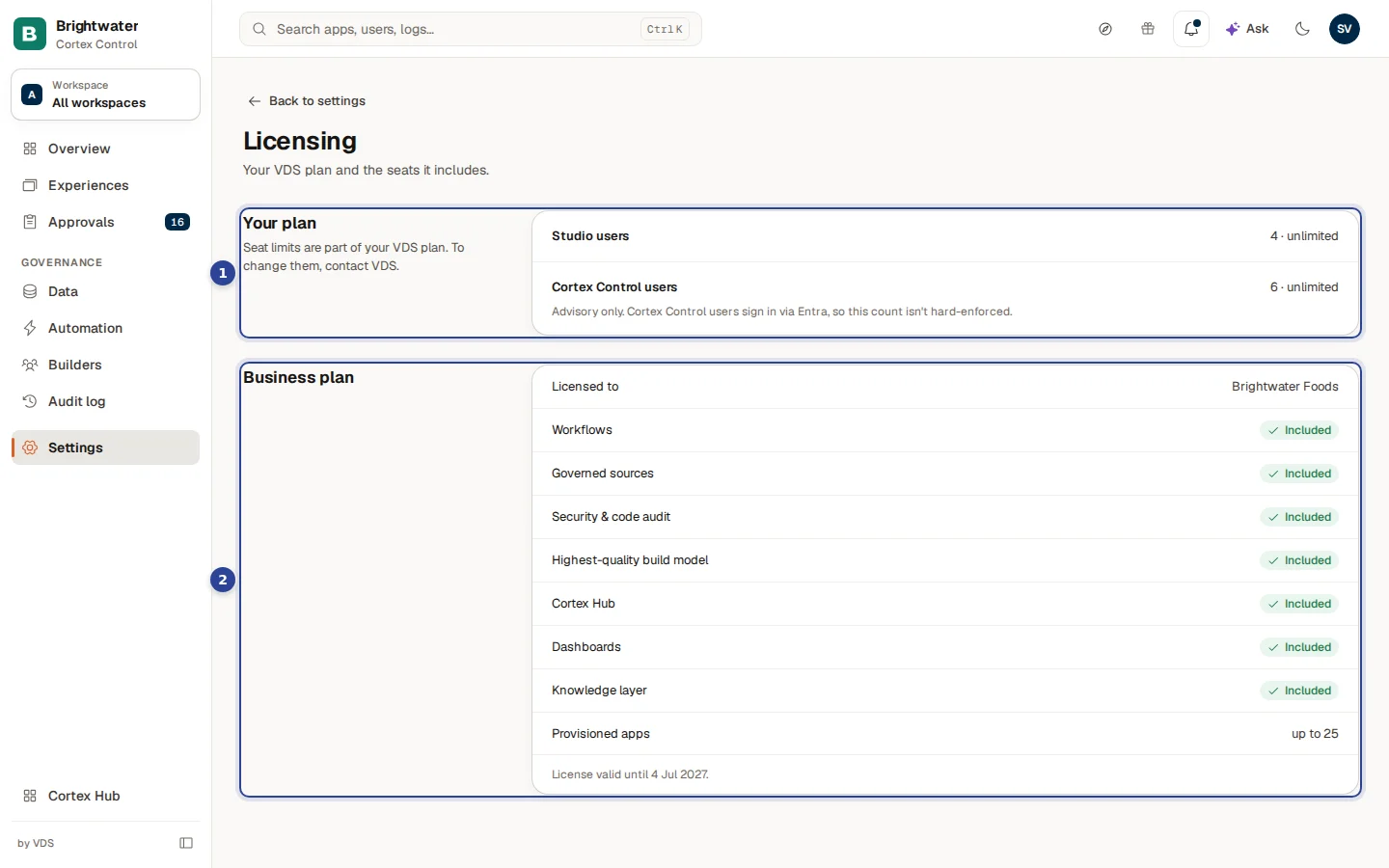
- Your plan. The seats of your plan. The note says "Seat limits are part of your VDS plan. To change them, contact VDS." Each row shows the number in use and the limit. With a limit it reads "4 / 10" and a bar fills up (it turns red at the limit); without a limit it reads "4 · unlimited", as here. Cortex Control users has the note "Advisory only. Cortex Control users sign in via Entra, so this count isn't hard-enforced."
- The plan block, titled with the name of your plan (here "Business plan"). It lists who the licence is issued to, every feature with Included or Not included, Provisioned apps and the date the licence is valid until.
What the page tells you
| Item | What it means |
|---|---|
| Studio users | The people who hold a Studio role (see People and Studio users). The count in use is shown against the limit. A number followed by unlimited means your plan has no cap. When the limit is reached the page says Seat limit reached. Contact VDS to raise your plan. |
| Cortex Control users | Advisory only. People sign in to Cortex Control through Entra, so this count is not enforced. |
| Licensed to and Licence ID | Who the licence is issued to, and its identifier, when your install has them. |
| Workflows | Whether your plan includes workflows. |
| Governed sources | Whether your plan includes governed data sources. |
| Security & code audit | Whether the advisory code scan on an app is included (see Apps). |
| Highest-quality build model | Whether the highest-quality build model is included. |
| Cortex Hub | Whether Cortex Hub for end users is included. |
| Dashboards | Whether dashboards are included. Without them the Dashboards tab in Approvals is hidden. |
| Knowledge layer | Whether the knowledge layer is included. |
| Provisioned apps | How many apps your plan allows: "up to 25", or unlimited. |
| License valid until | The date the licence expires ("License valid until 4 Jul 2027."). |
If seat or feature information cannot be loaded, the page says "Seat information is currently unavailable." or "Feature information is currently unavailable." instead of guessing.
Tasks
Check how many seats are free
Open Settings, Licensing and read the row Studio users. Compare the number in use with the limit.
Free up a Studio seat
Open Settings, Studio users and revoke the role of a person who no longer builds (the bin icon on their row). The count on Licensing drops. The Needs attention list on Overview also points out people who have held a Studio seat for a long time without building anything.
Raise the plan or enable a feature
You cannot change seats or features in Cortex Control. Contact VDS to raise the plan or to switch on a feature that says Not included.
Know before the licence expires
The Needs attention list on Overview warns that the licence expires in a number of days, and again when it has expired. Its button Open licence brings you to this page (see Overview and health).
Example: a seat request at Brightwater Foods
Brightwater wants two more people from the planning team to build dashboards. Sam de Vries opens Licensing and sees Studio users at 4 with no limit, so the plan has room. Sam adds both people under Studio users. If the row had said Seat limit reached, Sam would first have revoked an unused role, or asked VDS to raise the plan.
Frequently asked questions
Audit log
Find out who changed what in Cortex Control and when: filter the log, open an entry, see who looked at Cortex as someone else, and export it.
Source control
Every app's source code lives in a repository that Cortex hosts. Here you set where an optional read-only copy of each repository goes: GitHub, GitLab or Azure DevOps.