How Cortex works
The big picture: data sources, semantic models, trust and the experiences that read from them, followed by one figure from the ERP to Ask, a dashboard and a digest.
Every figure in Cortex comes from your organisation's semantic models: the agreed definitions of your data. Dashboards, Ask, apps and workflows read through them, always as the person who asks, so everyone only sees the data they have access to. That one design choice explains most of what Cortex does: why two screens show the same number, why the AI does not make figures up, and why a badge can disappear overnight.
This page gives you the big picture and then follows one figure, Brightwater Foods' revenue this year, from the ERP to your screen. The other pages in this section zoom in on each part.
Who can do this
This page is for everyone and describes how Cortex behaves. It has no steps to follow. The pages it links to say who can do what in each part.
From source to screen
Your ERP, CRM, warehouse or factory systems. IT connects them once.
What the data means: tables, links, figures, rules. Built by builders.
A figure is certified by its owner and re-checked against the source every night.
Ask, dashboards, apps, workflows. They ask the model, as you.
- Sources. Your data lives in the systems your organisation already uses: an ERP, a CRM, a warehouse, factory systems, or the data of apps built in Cortex. IT connects these sources in Cortex Control, so builders never handle a password. Cortex reads from them; it does not replace them. The platform also ships packs: ready-made connections for common business systems. See Data sources and Connector packs.
- Semantic models. A model describes what the data means: the tables, how they relate, and the named figures that people talk about, such as revenue or on-time delivery. It is the one place where "revenue" is defined. See Semantic models.
- Trust. Figures in a model can be certified by the model's owner, and Cortex checks them against the source every night. See Certified figures and nightly checks.
- Experiences. What people actually use: Ask, dashboards, apps and workflows. They do not query the sources themselves. They ask the model. See Experiences.
One figure, end to end
Follow the figure Revenue at Brightwater Foods.
IT connects the ERP
Sam de Vries, an admin, connects the ERP in Cortex Control under Data, with a connector pack. The password is stored by name only. Sam then makes the invoice data available as a dataset. See Data sources and Datasets and grants.
A builder asks for the data
Daan, a builder, needs invoice lines in a model. In Studio, under Sources, he requests access to the dataset with a reason. Sam approves it in Approvals. See Documents and sources and Approvals.
The model gives the data meaning
In the Sales model, Daan adds the invoice lines as a table, relates it to customers, and defines the figure Revenue: the sum of the invoice amount, only for invoices that are not cancelled. See Semantic models and Figures and certification.
The owner certifies and publishes
Daan, the model's owner, runs the reference check: Cortex compares the model's answer with an independent total from the source. The numbers match, so he certifies the figure and publishes the model. Nothing is live for anyone else before that.
Every night, Cortex checks again
From that night, Cortex compares the figure with the source again, over closed periods. If the ERP is corrected and the figure stops matching, the badge comes off everywhere and the model's owners are told. See Model checks.
People use it, in four places
Everyone reads the same figure, through the model, with their own access. See the table below.
| Where | What Sam or a colleague sees | What it is |
|---|---|---|
| Ask | "Revenue, 1 Jan to today" with a figure card, the period and a Certified figure label | The AI turned the question into a structured request; the model computed the number |
| A dashboard tile | The same figure in the finance dashboard, with its badge | The tile asks the model each time the dashboard opens |
| A pinned value | The figure on Home | A pin is a reference, not a copy: Cortex asks again each time |
| A digest or alert | A weekly summary, or a message when the figure crosses a value | Sent from the same model figure, only with data the recipient may see |
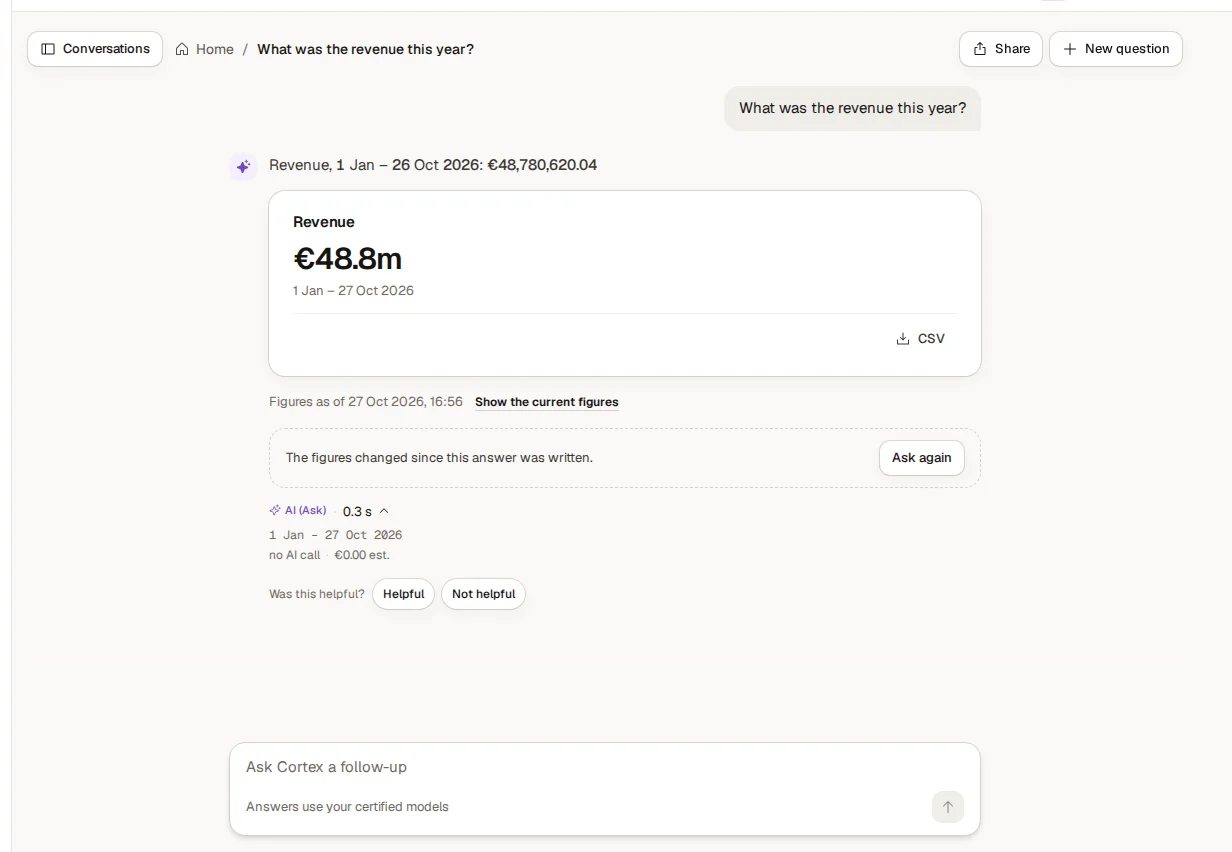
The details line says "no AI call": the figure came straight from the model. When the AI is needed, its job is to understand the question and to word the answer, never to calculate.
How a question becomes a number
In your own words, on Home.
It picks the figure, the filters and the period. It writes no database query.
From the sources, as you, with your access rules.
The sentence, a card, the source line. Numbers are checked against the model.
See Ask and AI for the full story, including how you check an answer.
Why this design?
Without a shared layer, each report has its own idea of a number. One dashboard counts cancelled orders, the next one does not, and the meeting starts with an argument about whose number is right. Cortex avoids that by defining a figure once. When the definition changes, everything that uses it changes with it.
It also makes the AI safer to use. When you ask a question, the AI does not invent a calculation. It picks the right figures and filters from the model, and the model computes the answer. If a figure is not in the model, Ask says "I don't know that figure yet" and can pass the gap on to the model's owner, rather than guessing.
Who sees what
Cortex always works as the person who is asking. The same question can give two people different answers if they have different access, because row rules in the model apply to each of them. A regional sales manager who asks for revenue gets the revenue of their own region. See Access and security.
Who does what
| Who | Where | What |
|---|---|---|
| Everyone | Cortex Hub | Asks questions and uses dashboards, apps and workflows |
| Builders (people with a Studio seat) | Studio, inside the Hub | Build experiences, maintain the semantic models, certify figures as owners |
| Admins | Cortex Control | Run access, policy, data sources, the AI engine, the licence |
Who can do what explains the roles.
Where Cortex runs
Cortex runs in your organisation's own environment. You sign in with your Microsoft work account. The AI engine is the one your organisation chose, set in Cortex Control (see AI engine and models). You can also reach Cortex inside Microsoft Teams, when IT has set it up (see Cortex in Microsoft Teams).