Ask and AI
How Ask builds an answer from governed data, how to check it, where AI is used and where it is not, and what Ask says when it cannot answer.
Ask is the one place in Cortex where you talk to the AI. You type a question on Home, in your own words, and Ask answers. This page explains how an answer is made, so you know when to trust it and how to check it. For the screen itself, see Ask Cortex.
Who can do this
Everyone who can sign in to Cortex Hub. Ask runs as you, so it only answers with data you may see. IT chooses the AI engine and its budgets in Cortex Control.
The idea: the AI understands, the model computes
In Cortex, the AI has one job: to understand your question and put the answer into words. It does not do the calculation. The numbers come from your organisation's semantic models.
Plain words: What was the revenue this year?
It picks the figure, the filters and the period. No free-form database query.
From the sources, as you, with your access rules.
Ask writes the sentence. The numbers in it are checked against what the model returned.
When you ask "What was revenue last month per region?", roughly this happens:
- Cortex finds which models could answer your question.
- The AI turns your question into a structured request: which figures, grouped by what, filtered how, for which period.
- The model computes the answer from the sources, as you. Your access rules apply.
- Ask words the result, adds a chart where it helps and shows what it is based on.
Ask never writes free-form database queries. And before an answer reaches you, the numbers in the sentence are checked against the values the model returned. When your question matches a verified question (an example question with a known right answer that a builder stored with the model), Ask can answer it without calling an AI model at all.
Example: four questions at Brightwater Foods
Sam de Vries asks four questions on a Monday morning.
| Sam asks | What Ask does | What Sam sees |
|---|---|---|
| "What was the revenue this year?" | Finds the figure Revenue in the Sales model, asks the model for 1 January until today | One sentence with the figure and the period, a figure card, the label Certified figure, and under it the details, which say "no AI call" when the question matched a stored one |
| "What stage is the Brouwer Yachting deal in?" | Reads the record from the connected system | The record's current value from the source system |
| "Revenue and absence hours in one number" | Sees that the two cannot be combined reliably | "Those two things can't be combined in one number reliably." |
| "What was the churn rate last quarter?" | Finds no such figure in any model | "I don't know that figure yet. It isn't in the data model." and, when the gap was passed on, "and I've noted it for the model's owner" |
Ask does not guess in the last two cases. It says what is missing, so the owner of the model can add it.
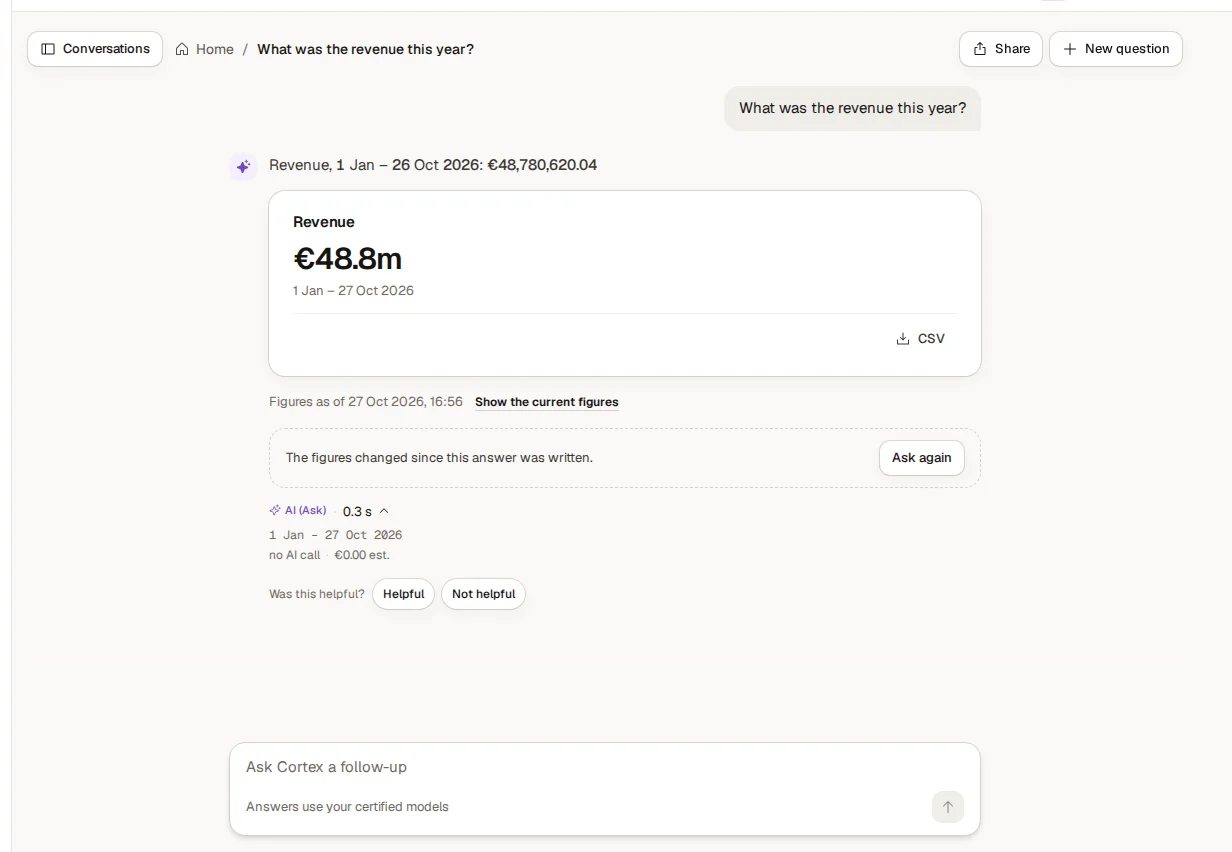
How I got this
Under an answer you find How I got this. It lists the figures used, the filters, the period and the date of the data ("Data as of ..."). That is the trail from your question to the number. If it is not what you meant, ask a follow-up: Ask keeps the conversation. When the answer comes from a certified figure, the stamp opens the proof that the figure agrees with its source and shows when it was last checked.
The labels on an answer
Labels tell you how much to rely on an answer.
| Label | What it means |
|---|---|
| Certified figure | The answer rests on a certified figure. See Certified figures and nightly checks. |
| Verified model: ... | The answer comes from a model whose answers have been checked. |
| Not verified: ... | The answer comes from a model whose answers have not been checked yet. Use with care. |
| AI (Ask) | An AI wrote the sentence around the figures. The figures themselves come from your data. |
| Interpretation | Ask's own reading of the figures above. The figures are from your data; the conclusion is not checked by your data team. |
| From documents | The answer is taken from documents your organisation attached. It is not checked by the data team. |
An answer without the Certified label is not wrong by definition, but nobody has certified the figure yet, so check it before you rely on it for something important.
Answers from documents
Models can have documents attached: manuals, procedures, specifications. When your question is about those, Ask searches them and quotes the passages it used ("In the document: ..."), with the list of documents. A statement that cannot be checked against the documents is left out, and Ask tells you how many were dropped. Scanned documents are read with OCR, and the answer shows how sure the reading was. Answers from documents are always marked as such, never as certified figures. See Documents and sources.
Where the AI does not type numbers
- In an Ask answer, the numbers come from the model, not from the AI's memory.
- On a dashboard, each tile asks the model for its figures when you open it. An AI never types a figure into a tile: a text tile is a template with placeholders that are filled from the model.
- If Ask cannot answer reliably, it says so and tells you why, for example when two things cannot be combined in one number, when it needs to know which date you mean, or when a figure is not certified and you asked for an explanation of a change, which needs one.
What Ask says when it cannot answer
| You see | What it means | What to do |
|---|---|---|
| "I don't know that figure yet. It isn't in the data model." | The figure is not defined in any model you can use | Ask in other words, or ask a builder to add it. See Figures and certification |
| "That isn't available to you." | The figure exists but your access does not include it | Ask the owner of the data or your IT team for access |
| "That question needs personal data. Its values are not given to me, so I can't show them or calculate with them." | The question needs a field that holds personal data. Cortex does not give the values of personal data to the AI | Ask for a figure that does not need personal data |
| "Those two things can't be combined in one number reliably." | The model cannot add them up correctly | Ask for them separately |
| "Which date do you mean?" | The question needs one date to count by | Say which date |
| "What you asked for is in a data model outside this workspace." | The data is in another workspace | Switch workspace or choose All workspaces. See Workspaces |
| "I can't help with that topic." | Ask answers questions about your data and about Cortex itself | Ask about your data or about Cortex |
| "I can't use '…' to answer this question." | The AI tried a field name that the data model does not have | Ask in other words |
What Ask can and cannot do
Ask answers questions about your data and about Cortex itself. Other topics are politely refused.
Ask can also propose something, such as a dashboard for a question you keep asking, an app, or a subscription to a figure ("Keep an eye on ..."). It never does it by itself: you confirm in Cortex. A draft made this way stays private until a builder publishes it.
Ask runs as you, so it only answers with data you may see. See Access and security.
Where you meet Ask
- On Home, in the question box, and from the sparkle button at the top of every page.
- In the search box: when nothing matches, the last row asks Cortex your text as a question.
- On a dashboard, as a question about the whole dashboard or one tile. See Use a dashboard.
- In Cortex Control, as a question box about access, approvals and cost.
- In Studio, builders also get Build something next to the question box.
The AI engine your organisation chose
Cortex is not tied to one AI vendor. Your organisation chooses the AI engine, and IT sets it in Cortex Control, with a model for each of three tiers: Small, Medium and Large. IT can also set budgets and limits for AI use. See AI engine and models and Cost and limits.
If your organisation requires its data to stay in the EU, IT can switch on EU only. Cortex then only lets IT use engines that run in the EU for the tiers, and greys out the others. Which engines that leaves depends on what is available for your organisation.
Tips for good questions
- Name the figure and the period: "scrap rate last week".
- If Ask says it needs a date, tell it which one: "by order date".
- Use the follow-up box to narrow down, rather than starting over.
- If you get a "Not certified" answer for something important, ask the model's owner to certify the figure.
- Use the thumbs ("Helpful", "Not helpful") on an answer. They tell the owners what to improve.
Access and security
How sign-in, roles, sharing, row rules and stored credentials make sure people see what they may see in Cortex, shown with three people asking the same question.
Experiences
Dashboards, apps and workflows: what each is for, how to choose between them and how they work together, with an example from Brightwater Foods.