Subscriptions
See every digest and alert you get from Cortex Hub, pause, resume or remove them, and manage the permission that lets Cortex read limited data for you.
The Subscriptions page is the one place where you see everything Cortex sends you on a schedule: the digests and alerts you set up with Subscribe on a dashboard, and the questions Cortex keeps an eye on for you. You can pause a subscription, resume it, remove it, and see why one has stopped.
Subscribing itself happens on the dashboard, see Pin a value, pin a dashboard, subscribe. This page is for looking after what you already have.
Who can do this
Everyone who can sign in to Cortex Hub. You see and change only your own subscriptions.
Open the page
Open your account menu (your initials, top right) and choose Subscriptions. From the notification bell you get there with Manage subscriptions. After you set up a subscription, the confirmation says "Subscribed. You can change it under Subscriptions."
The list
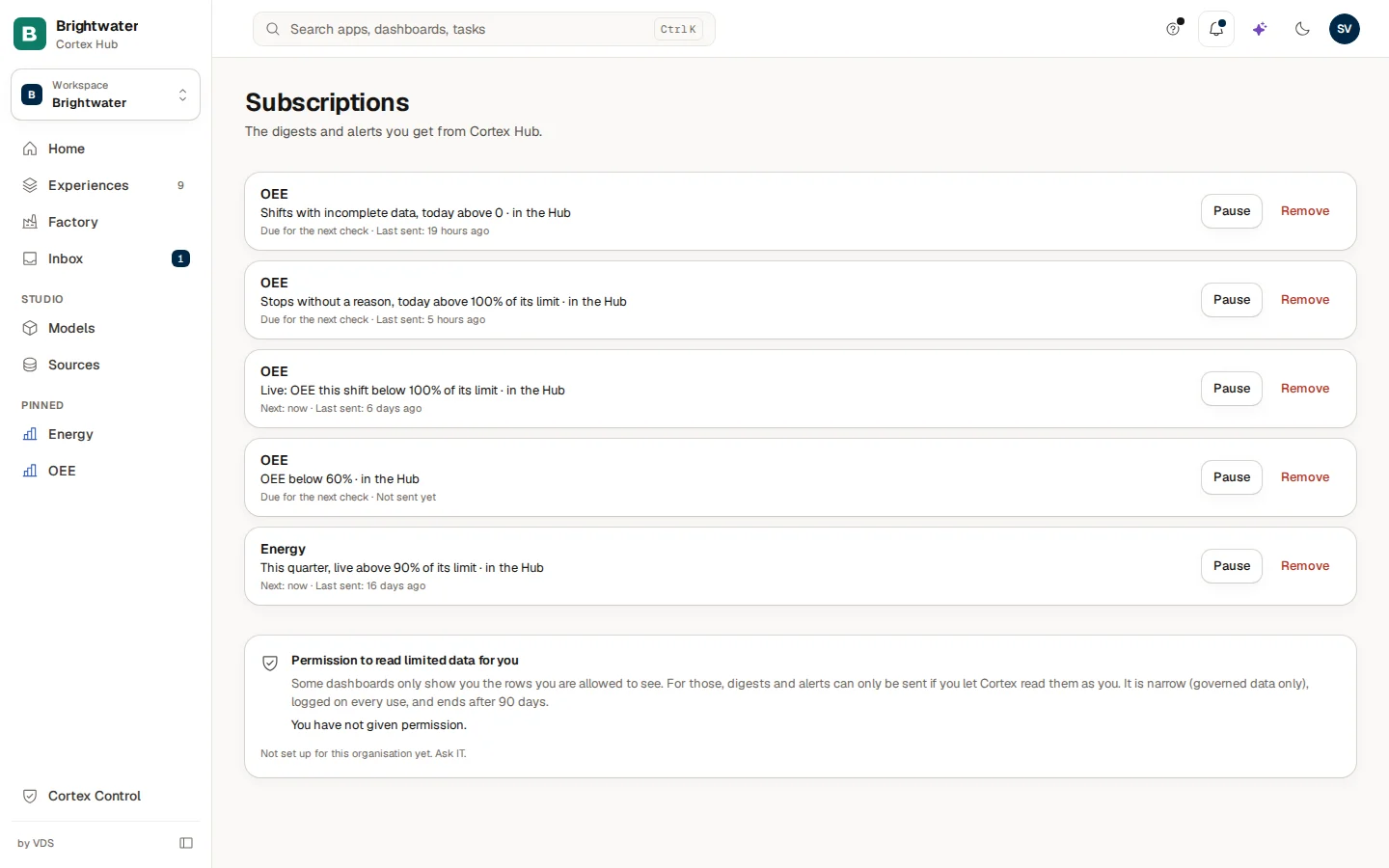
Under the title Subscriptions ("The digests and alerts you get from Cortex Hub.") every subscription is a card with:
- The dashboard name. Select it to open the dashboard.
- What it sends. For a digest, for example "Every Monday digest". For an alert, the KPI and its rule, for example "Shifts with incomplete data, today above 0". A limit on a percentage figure is shown as a percentage, for example "above 100% of its limit".
- Where it goes. "by email", "in the Hub" or "in a Teams channel", after a dot.
- When. "Next: in 55 minutes" or "Due for the next check", and "Last sent: 1 hour ago" or "Not sent yet".
- Pause or Resume, and Remove.
A subscription made from an Ask answer ("Keep an eye on ...") shows as a question, for example "Every day question ...", without a link, because it does not belong to one dashboard.
| Part of the card | Meaning |
|---|---|
| "Next: ..." | When Cortex checks or sends again. An alert is checked on a regular cycle and only sends when its rule is true. |
| "Due for the next check" | The check is due now. |
| "Last sent: ..." | The last time something was sent to you. |
| "Not sent yet" | Nothing was sent yet, for example because an alert's rule was never true. |
| "Paused" | You paused it. Nothing is sent until you choose Resume. |
| A red line starting with "Stopped" | Cortex stopped it. The line says why. See the table below. |
Pause, resume or remove
Pause when you are away
Choose Pause on the card. The card gets "Paused" and nothing is sent. Choose Resume to continue.
Remove what you no longer need
Choose Remove. Cortex asks "Remove "name"?" and says "You will stop receiving it. You can subscribe again from the dashboard." Choose Remove to confirm. Cortex says "Subscription removed."
Change a subscription
There is no edit button. To change the schedule, the value or the place, remove the subscription and subscribe again from the dashboard.
When there is nothing here, the page says "You have no subscriptions yet. Open a dashboard and choose Subscribe."
Why did a subscription stop?
A subscription that Cortex stopped shows a red line and no Pause button. The ones about your permission start again by themselves as soon as you fix it. For the others you subscribe again.
| The card says | What happened and what to do |
|---|---|
| "Stopped: it needs your permission to read restricted data. Give permission below and it resumes." | The dashboard shows rows limited to certain people and you have not given permission. Use Give permission below. |
| "Stopped: your permission has expired. Renew it below and it resumes." | The permission ends after 90 days. Choose Renew below. |
| "Stopped: your sign-in changed, so the permission no longer works. Give it again below and it resumes." | Give permission once more. |
| "Stopped: the permission was withdrawn." | You or IT withdrew it. Give permission again if you still want the subscription. |
| "Stopped: you no longer have access to this dashboard." | Ask the owner or IT for access, see Use a dashboard. |
| "Stopped: this dashboard is no longer available." | The dashboard was retired. Remove the subscription. |
| "Stopped: the KPI is no longer on the dashboard." | The maker removed the tile. Remove it and subscribe to another KPI. |
| "Stopped: the KPI no longer shows a comparison with the previous period." | The alert compared with the previous period and the KPI no longer does. Subscribe again with a fixed value. |
| "Stopped: email is not available for you. Switch to the Hub bell." | Email is not set up for you. Remove it and subscribe again with In the Hub (bell). |
| "Stopped: the Teams channel is not available any more. Ask IT, or pick another channel." | Subscribe again with another channel. |
| "Stopped: this dashboard now shows data limited to certain people, so it cannot be posted to a shared Teams channel. Choose email or the Hub bell." | A shared channel may not carry limited data. Subscribe again with email or the bell. |
| "Stopped: the question is no longer part of the approved model." | The question behind an Ask subscription was withdrawn. Remove it. |
| "Stopped after repeated delivery failures. Subscribe again to retry." | Sending failed several times. Subscribe again. |
| "Stopped. Subscribe again to re-check it." | Any other reason. Subscribe again. |
The permission to read limited data

Some dashboards only show you the rows you are allowed to see. A digest or alert about such a dashboard is sent while you are not looking, so Cortex needs your permission to read that data as you. The block under the list is called Permission to read limited data for you. It explains that the permission is narrow (governed data only), logged on every use and ends after 90 days.
| What you see | What it means |
|---|---|
| "You have not given permission." and Give permission | Nothing is given yet. Choose Give permission and complete the Microsoft consent step. You return to this page and see "Permission given. You can subscribe now." |
| "Active until ... Used ... times." with Renew and Withdraw | The permission works. Renew extends it. Withdraw ends it at once: "Permission withdrawn. Subscriptions on limited data are stopped." |
| "Not set up for this organisation yet. Ask IT." | Your organisation has not enabled the permission step. Ask IT. Subscriptions on limited data cannot be sent until then. |
| "Open the Hub in your browser to give permission." | You are in Microsoft Teams. Open the Hub in your browser for this step. |
You need this permission only for dashboards that show limited data. Other digests and alerts never ask for it.
Example: Sam cleans up before a holiday
Sam de Vries at Brightwater Foods opens Subscriptions from the account menu. Five alerts are listed.
- Sam pauses "Shifts with incomplete data" for the holiday week. The card says Paused and Resume appears.
- "OEE below 60%" says "Not sent yet": the OEE never dropped that low. Sam leaves it.
- One card shows a red line, "Stopped: your permission has expired. Renew it below and it resumes." Sam chooses Renew in the permission block, completes the consent step, and the card resumes.
- Sam removes an old alert on a dashboard that is not used any more.
Questions and problems
Pin a value, pin a dashboard, subscribe
Keep a figure on Home, pin dashboards and apps in the menu, and get a digest or an alert by email, in the Hub or in a Teams channel.
The notification bell
What arrives in the bell at the top of Cortex Hub, how read and unread work, where each line leads and what does not appear there.