The notification bell
What arrives in the bell at the top of Cortex Hub, how read and unread work, where each line leads and what does not appear there.
The bell in the top bar is where Cortex tells you something without you asking. It collects the digests and alerts you chose to receive in the Hub, reminders about your permission and a few updates from Cortex itself. It is for information only: nothing in the bell asks you to decide anything.
A small dot on the bell means there is news. Open the bell, read the lines, select one to go to the dashboard or page it is about.
Who can do this
Everyone who can sign in to Cortex Hub. The bell shows only your own notifications.
The bell at a glance
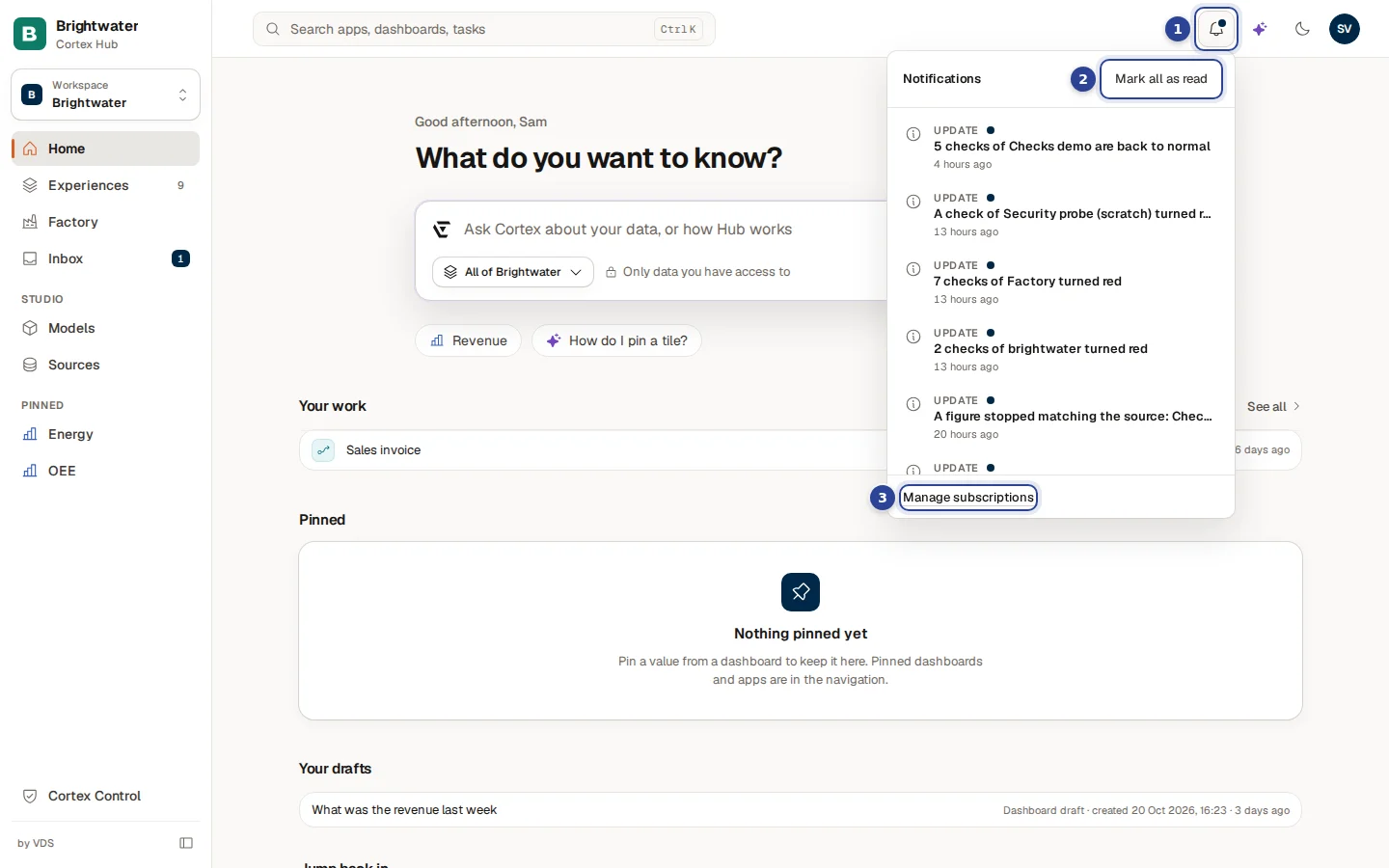
- The bell. Its accessible name is Notifications, with the number of unread lines after it ("Notifications, 3 unread"). The dot on the bell shows while something is unread. The bell checks for news about once a minute and again when you come back to the browser tab.
- Mark all as read. Marks every line as read in one go. The button only shows while something is unread.
- Manage subscriptions. Opens the Subscriptions page, where you pause or remove what is sent to you.
Every line has four parts: a small icon, a label in capitals (Digest, Alert, Renew, Failure or Update), a dot while it is unread, a title in bold while unread, and how long ago it arrived. A long title is cut off with dots; select the line to open the full page.
What arrives in the bell
| Label | What it is | Where the line leads |
|---|---|---|
| Digest | The scheduled summary of a dashboard you subscribed to, with In the Hub (bell) as the place. | The dashboard, live. |
| Alert | A KPI crossed the value you set. | The dashboard. |
| Renew | Your permission to read limited data for digests and alerts ends soon. | The Subscriptions page, where you renew it. |
| Failure | Something Cortex ran for you failed. | The page the line is about. |
| Update | Other news from Cortex: the answer to a question Cortex keeps an eye on for you, that a figure's nightly check stopped matching the source, or that a clean-up of unused experiences is suggested. You get the last two only when it concerns something you look after. | The page it is about. A line without a link only marks itself as read. |
A line never carries a governed figure. It says that something is worth a look and links to the live dashboard, which draws the figures with your own access. An email can carry the figures, because it goes to your own mailbox.
What does not appear in the bell
- Tasks. A task that a workflow assigned to you does not appear here. The number next to Inbox in the menu goes up, and you may get an email. See The Inbox.
- Answers to your access requests. They show as a dot in the Sent tab of the Inbox.
Read the bell
Look for the dot
A dot on the bell means one or more lines are unread. The accessible name gives the number.
Open the bell
Select the bell. The list opens under it, newest first, with unread lines in bold. When you have no news, it says "Nothing new."
Select a line
Select a line to open what it is about. The line is marked as read and the bell closes. A line with no link only marks itself as read.
Clear the rest
Choose Mark all as read when you have seen enough. The dot goes away.
Example: Sam reads the morning news
Sam de Vries at Brightwater Foods sees the dot on the bell at 08:05.
- Sam opens the bell. Three lines are unread, each labelled Update. The first two say that a figure stopped matching the source in its nightly check. The third says a clean-up of an unused experience is suggested.
- Sam selects the first line. It opens the page it is about, and the line turns normal weight.
- The other two are for the data team. Sam chooses Mark all as read. The dot is gone.
- Because Sam wants fewer lines, Sam chooses Manage subscriptions and removes an alert that is no longer useful.